Advertisements

Showing posts with label BPEL. Show all posts

Tuesday, February 17, 2015

SOA Error - "Failed to compile bpel generated classes"

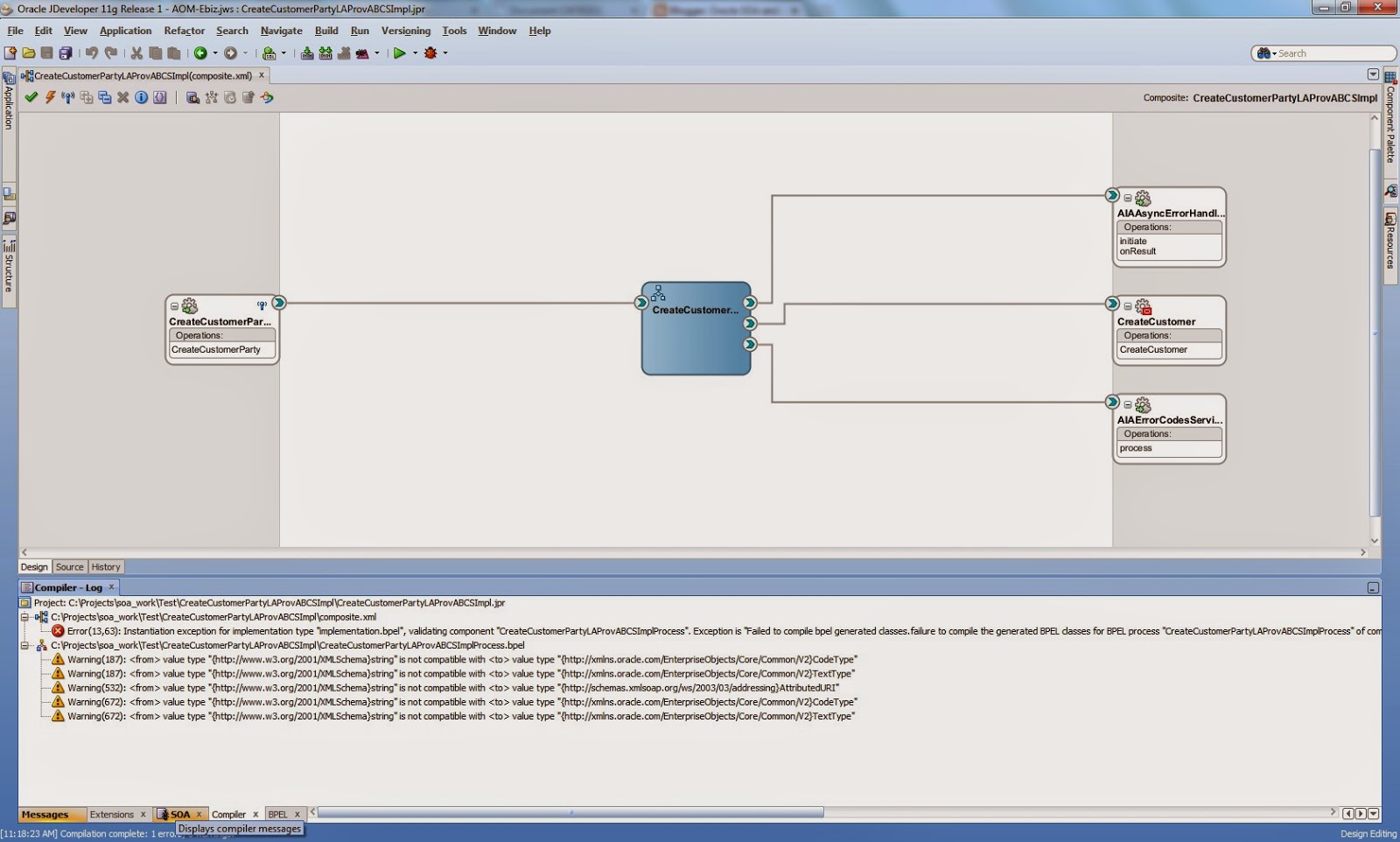
When trying to compile an AIA composite project I'm getting the following error:


Error(13,63): Instantiation exception for implementation type "implementation.bpel", validating component "CreateCustomerPartyLAProvABCSImplProcess". Exception is "Failed to compile bpel generated classes.
failure to compile the generated BPEL classes for BPEL process "CreateCustomerPartyLAProvABCSImplProcess" of composite "default/CreateCustomerPartyLAProvABCSImpl!1.0"
The class path setting is incorrect.
Ensure that the class path is set correctly. If this happens on the server side, verify that the custom classes or jars which this BPEL process is depending on are deployed correctly. Also verify that the run time is using the same release/version."

This is because I'm missing a library:

Go to project preference/Library classpath

Add the library aia.jar:


Solved!


Wednesday, February 5, 2014

Example query-database in BPEL 11g

This is an example of how to query directly from the database from BPEL, it can be done using an Assign or Tranform (XSLT).


        oraext:query-database("SELECT COUNT (STORE_ID) AS TOTAL_PROMO FROM SE_INT_FWK.SE_CAT_STORE",true(),true(),"jdbc/fwk")
        $totalStores


Thursday, January 16, 2014

BPEL 11g Handle XML without a namespace

Ahora me he encontrado con un escenario en el cual recibo un XML de un sistema externo y el XML no cuenta con un namespace.

Para este tipo de escenario siempre primero genero su correspondiente XSD usando el JDeveloper.


Voy a poner de ejemplo el sig. XML:


    NULL
    2.8 GHz Computer
    DSC
    3658
    HBISCPU
    1
    105913
    722.18
    722.18
  
  
    NULL
    2.8 GHz Computer
    DSC
    3658
    HBISCPU
    1
    105813
    722.18
    722.18


Ahora voy a proceder a generar su XSD.

En JDevelper presionamos "New" y en la galeria seleccionamos "XML Schema from XML Document"


Llenamos los datos para generar el nuevo esquema:


Para esto hay que dejar en blanco el campo de "Target Namespace".

El XSD quedaria de la siguiente manera:


Ahora podemos importar nuestro XSD en BPEL para poder crear una variable y recibir el XML.

Wednesday, October 9, 2013

BPEL 11g - Disabling the Auto recovery

En este blog encontre esta solucion interesante para deshabilitar el "Recovery" y evitar que las instancias de BPEL se queden en el estatus "Running".

http://www.albinsblog.com/2011/10/oracle-soa-suite-11g-disabling-auto.html#.UlWnNVC3_Al


Scenario 1:Auto Recovery only for sync process.

  1. In the navigator, right click "soa-infra" and select "SOA Administration Common Properties" Advanced More SOA Infra advanced Configuration Properties
  2. In the Name Column, click GlobalTxMaxRetry (The maximum of times  a GLOBAL_RETRY FabricInvocationException can be retried before bubbling up)
  3. Set GlobalTxMaxRetry = 0 (Default : 2)
  4. Similary, GlobalTxRetryInterval (The number of seconds between retries in the case of GLOBAL_RETRY FabricInvocationException) Set GlobalTxRetryInterval = 0 (Default : 3)


Scenario 2: Disabling recovery attempts for faulted instances.
1. Log in to Oracle Enterprise Manager Fusion Middleware Control.
2. Right-click soa-infra.
3. Select SOA Administration > BPEL Properties.
4. Click More BPEL Configuration Properties.
5. In the Name column, click RecoveryConfig.
6. Expand RecurringScheduleConfig.
7. Set the following properties to values and click Apply.
maxMessageRaiseSize =0
8. Expand StartupScheduleConfig, respectively.
9. Set the following properties to values and click Apply.
maxMessageRaiseSize=0